Sidebar
Trades Tab
Open the sidebar. Every trade the FlowEntry bot is currently running is right there. Coin, direction, days open, max paper P&L. One click, you’re on the chart.
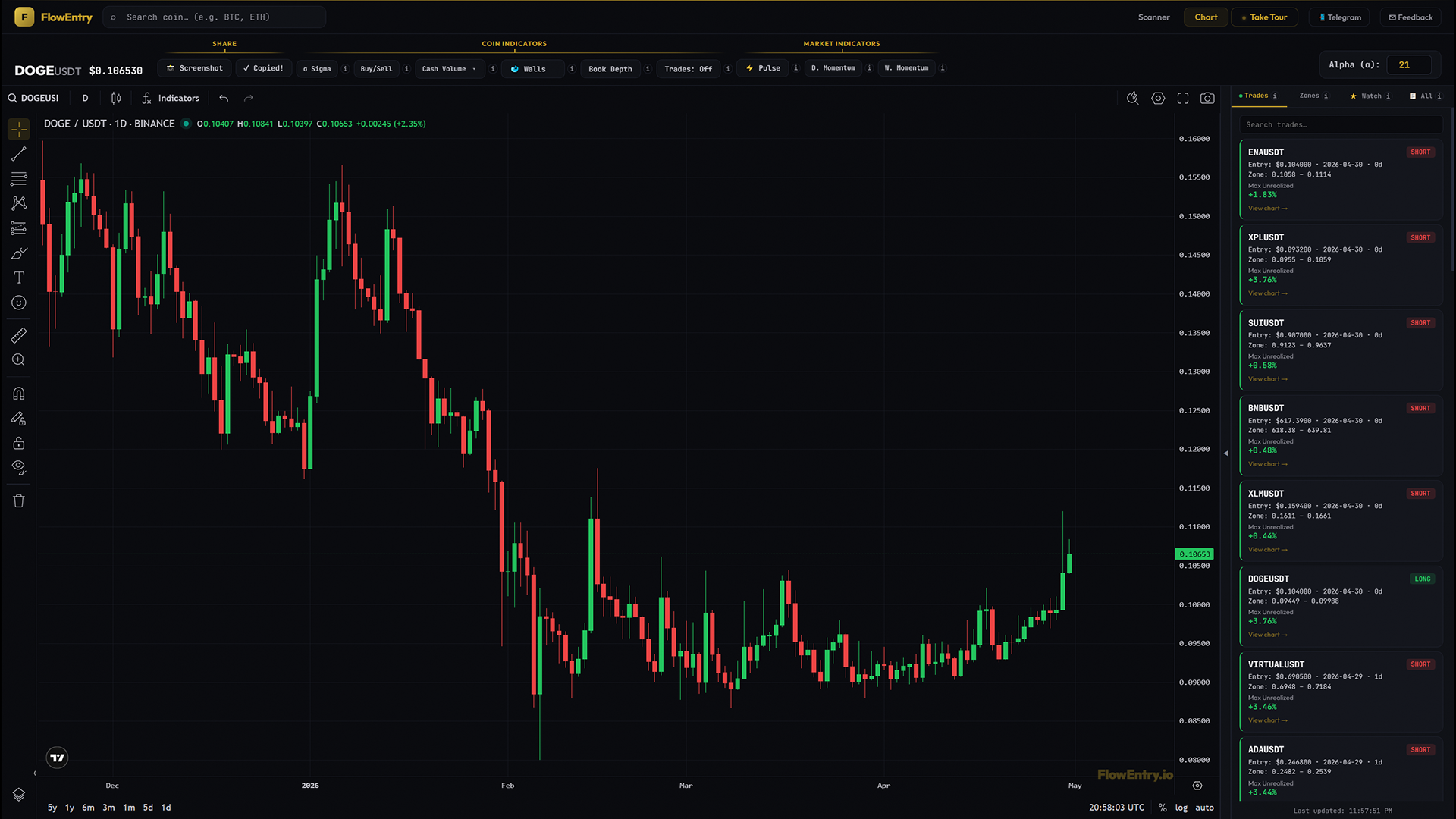
What it answers
- “What is the bot in right now?”
- “Which positions are currently winning, and by how much at peak?”
- “How long has the bot been holding this trade?”
- “Which open coin should I look at first?”
Mental model
The Trades tab is the bot’s open book. Every position the bot is currently in, on a single screen.
One card per trade. Each card tells you which coin, which side (long or short), where it got in, how long it has been open, the zone it is playing, and the peak paper P&L it has reached so far (Max Unrealized). Brand-new trades opened today have no max number yet; the field is blank until the trade has its first favourable move.
The percentage is the differentiator. A trade with +0.05% max is barely off entry; a trade with +5.85% max has already had a real move on the table at some point. Compare the numbers, not the colours.
How to use it
- Daily check-inOpen the chart, glance at the sidebar. The Trades tab is always the default. You instantly see the bot’s full open book without clicking anything.
- Pick the next chart to studyScan the cards by Max Unrealized magnitude. The biggest mover is the cleanest case study. Trades with no max number yet are brand-new. Click the card → drop onto the chart → look at the entry against Sigma, Buy/Sell, and Cash Volume to see why it moved.
- Search instead of scrollIf the bot has 30 open trades and you only care about one coin, type it into the search box. Substring match.
- Build conviction by watching across daysA card stays in the tab as long as the trade is open. Days-open plus max-unrealized rising over a week tells you a story (sustained move) that a single chart snapshot can’t.
- Learn the strategy without trading itEven if you never copy a trade, watching the open book in real time teaches you what FlowEntry’s rules look like in the wild. You internalise the entry pattern faster than from any backtest table.
What it doesn’t do, and when not to use it
The Trades tab does not place trades for you. It does not show closed trades; once a trade closes it disappears from this tab and shows on the chart via Trade Markers in “Trades: All” mode. It is not personalised; every paid user sees the same open book.
Don’t treat the cards as your only signal. They tell you what the bot is in, not what you should be in. Click into the chart and apply your own read. And don’t treat a green-bordered card as a guarantee; stop-and-reverse can flip outcomes at any daily close.
Why it works
Most “trading bots” are black boxes; you see results, never the live state. The Trades tab is the opposite. Every position the bot is currently running is fully visible, with the same timestamps and prices the bot itself is using. Combined with Trade Markers on the chart, you can audit every claim end-to-end. There is nothing hidden between the strategy and the user.
Examples
Case A: book stacked with high-magnitude max
- Setup.
- Bull regime; bot has 8+ open trades.
- Signal.
- Several cards show Max Unrealized of +5% to +15%; few cards are blank or near-zero.
- Outcome.
- Strong portfolio-wide tailwind. Most positions have already had real moves on the table.
- Lesson.
- When Max Unrealized magnitudes are broadly high, the strategy is in alignment with the regime.
Case B: book of fresh trades
- Setup.
- After a hot Pulse day, several new entries fire on the same UTC close.
- Signal.
- New cards show entry plus zone but no Max Unrealized line.
- Outcome.
- TBD. These trades have not yet had a favourable move large enough to record a peak.
- Lesson.
- A book full of 0d-old trades with blank max fields means the bot just stepped in. Wait a day or two before evaluating.
Case C: split book
- Setup.
- Some cards show Max Unrealized of +5%+, others sit at +0.1%.
- Signal.
- High-magnitude trades cluster around one segment of the market; near-zero ones around another.
- Outcome.
- Reveals which segments of the market are actually rotating; the high-magnitude cards are where the real moves are.
- Lesson.
- The magnitudes tell you where the rotation is concentrated.
Case D: single trade running long
- Setup.
- One card shows 42d days open with +18.4% max-unrealized.
- Signal.
- That trade is the bot’s biggest current conviction by both duration and magnitude.
- Outcome.
- Watch closely. Daily-close stop logic means the next bad close could end it.
- Lesson.
- Old open trades with high max numbers carry both reward and risk. They are the most “earned” positions in the book.