Learn FlowEntry

Resources

Everything you need to understand and use FlowEntry effectively. Start with the Quick Start Guide, then explore specific features.

Quick Start Guide

Get started in 3 minutes

1. Create Your Account

Sign up for a free account at flowentry.io/signup. You need an email, a username, and a password. Once registered, log in to access the platform.

2. Launch the App

Click the golden "Launch App" button in the top-right corner of the website. This opens the charting application where all the data lives — the scanner, charts, indicators, trades, and zones.

3. Read the Scanner

The scanner is the first thing you see. It shows every coin that triggered a liquidity event today as a colored tile. Brighter tiles = stronger signal. Click any tile to open its chart.

4. Check the Chart

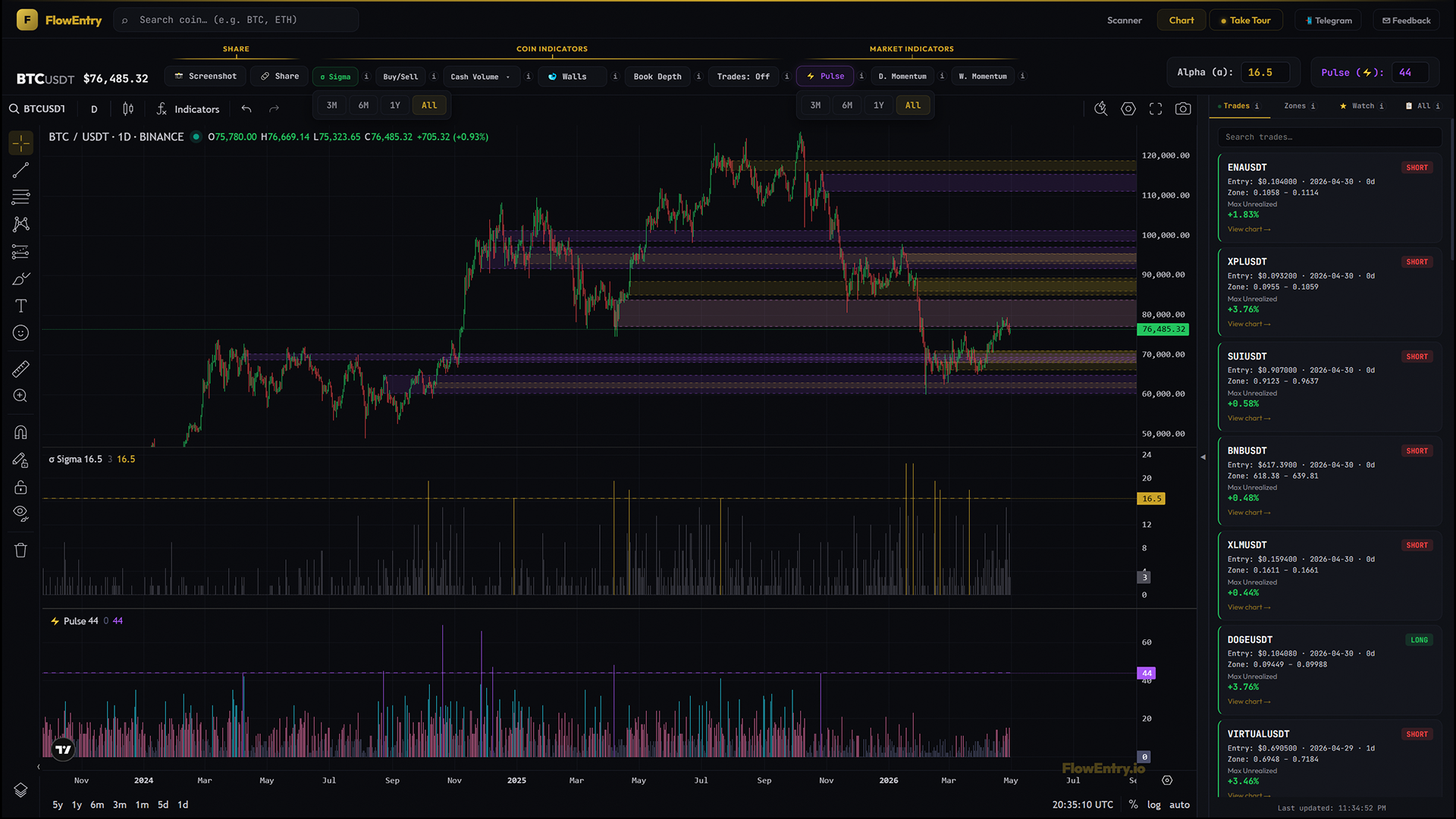
Each coin has a price chart with 5 histogram indicators below it. These show you the liquidity flow history. Gold zones on the chart mark where unusual flow was detected.

5. Join Telegram

Join the free Telegram channel at t.me/flowentry3 to get daily alerts delivered to your phone. The bot posts coin names, Pulse readings, and trade updates automatically.

Understanding the Scanner

What the heatmap shows and how to read it

What Is the Scanner?

The scanner is a real-time heatmap of all 600+ Binance USDT trading pairs. Each tile represents one coin. The scanner updates continuously and shows which coins had unusual liquidity flow detected today.

Reading the Tiles

Each tile shows the coin name and its sigma value — a measure of how strong the liquidity event was. Higher sigma = stronger signal. Tiles are color-coded: gold tiles have the strongest signals, gray tiles have weaker ones.

Scanner Glow

Some tiles may have a colored glow around them. This indicates an order book imbalance — meaning buyers or sellers have significantly more orders stacked up. Green glow = buyer imbalance. Red glow = seller imbalance.

Clicking a Tile

Click any tile to open that coin's full chart. You'll see the price history with all 5 indicators, historical zones, and any open/closed trades for that coin.

Reading the Indicators

What each of the 5 indicators tells you

Sigma (Gold)

The Sigma histogram shows the daily liquidity event magnitude for each coin. Taller gold bars mean more unusual flow was detected on that day. Think of it as a "loudness meter" for smart money activity. When sigma crosses the alpha threshold, a zone is created.

Buy / Sell Split (Green / Red)

This shows the percentage breakdown of buying versus selling pressure on each day. Green bars = buyers are dominating. Red bars = sellers are in control. This helps you understand the direction of the flow, not just its intensity.

Pulse (Purple)

The Pulse is a market-wide indicator. It counts how many coins across the entire market crossed their threshold on each day. A high Pulse reading (purple zone, 25+) means there's broad market activity — potentially signaling a market direction change. Low readings (below 10) mean low activity.

D. Momentum (Green / Gold / Red)

Daily Momentum shows market breadth — how many coins across the market are trending up on a daily basis. Green = many coins trending up (bullish). Gold = neutral. Red = few coins trending up (bearish).

W. Momentum (Blue)

Weekly Momentum is the same concept as Daily Momentum but on a weekly timeframe. It filters out daily noise and gives you a longer-term view of market breadth. Blue tiers show the strength of the weekly trend.

How Zones Work

The core concept behind FlowEntry

What Creates a Zone?

When the bot detects that a coin's daily sigma value crosses its alpha threshold (a per-coin sensitivity setting), a zone is created. The zone is the price range from the day's low to the day's high — this is the area where smart money was active.

Zone Boundaries

Each zone has a top (day's high) and a bottom (day's low). These boundaries represent the price range during the unusual flow event. Zones appear as colored rectangles on the chart.

When to Enter

A trade entry is triggered when price breaks out of the zone. If the daily candle closes ABOVE the zone = long (buying opportunity). If it closes BELOW = short (selling opportunity). The bot tracks these entries automatically.

Zone as Support/Resistance

Even without trading, zones serve as powerful support and resistance levels. Historical zones that coincide with heavy liquidity flow tend to be areas where price reacts. Many traders use them as reference levels for their own analysis.

Glossary

Quick definitions of FlowEntry terms

Sigma

A measure of liquidity event magnitude per day per coin. Higher sigma = stronger detected flow. Displayed as gold histogram bars on the chart.

Alpha

A per-coin threshold value. When raw sigma count meets or exceeds alpha, a zone is created. Each coin has its own alpha value tuned to its typical activity level.

Pulse

A market-wide indicator that counts how many coins crossed their alpha threshold today. High Pulse = broad market activity. Used to detect market direction changes.

Zone

A price rectangle drawn on the chart from the day's high to the day's low when sigma crosses alpha. Represents the area where unusual liquidity flow was detected.

D. Momentum

Daily market breadth indicator. Shows how many coins across the market are trending up on a daily basis. Green/Gold/Red tiers.

W. Momentum

Weekly market breadth indicator. Same concept as D. Momentum but on a weekly timeframe for longer-term trend confirmation.

Whale Walls

Large buy or sell orders detected in the order book. Drawn as horizontal lines on the chart showing where big players have orders stacked up.

Book Depth

Order book depth ratio across 5 price bands. Shows the balance between buy-side and sell-side liquidity at different distances from current price.

Scanner

The real-time heatmap that shows all 600+ Binance USDT pairs. Each tile represents a coin and its current sigma value.

Ready to start?

Create a free account and launch the app to explore all features.